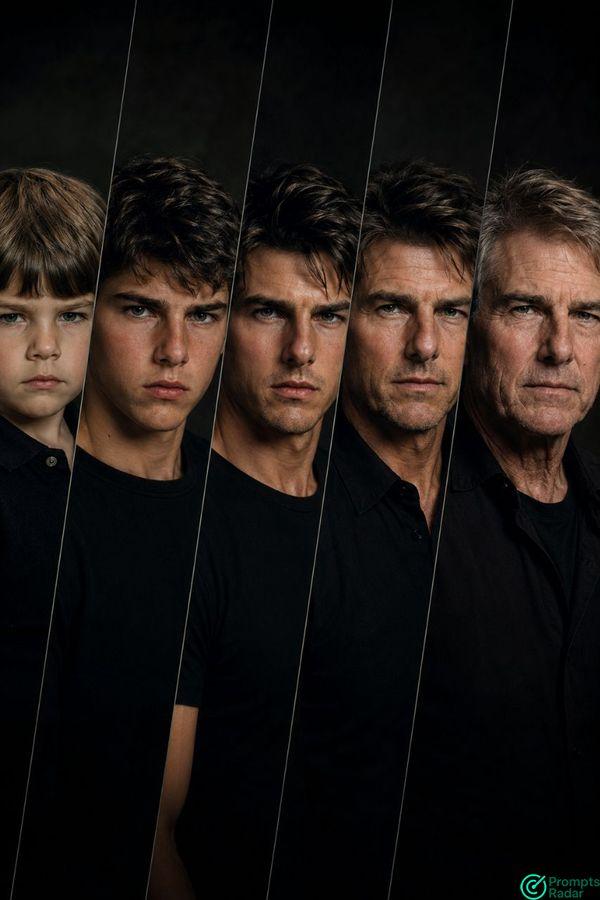
This prompt is designed to generate a sophisticated age progression composite portrait.
To use it effectively:
1. Reference Image: Attach a clear, high-resolution close-up portrait of a male child (preferably age 5-7) to serve as the 'Young Child: age 6' reference. The AI will use this face as the foundation for the entire progression, ensuring facial consistency across all stages.
2. Age Adjustment: The original prompt's 'Teenager: age 75' was corrected to 'Teenager: age 16' for a logical age progression. You can slightly adjust this specific age (e.g., to 14 or 18) if desired, but keep it within a sensible teenage range.
3. Expected Output: A single, wide vertical image containing five diagonally separated close-up portraits of the same male individual aging from child to elder, adhering to the specified cinematic and photo-realistic style.
4. Customization: While the prompt is highly specific, you can experiment by slightly altering lighting nuances (e.g., 'single strong spotlight' vs. 'soft spotlight') or background details if your AI supports such granular control. Ensure 'cinematic' and 'photo-realistic' qualities are maintained for the best results.
VIPCinematic AI Age Progression Portrait prompt Child to Elder Composite
AI prompt created by PromptsRadar
Instructions

PromptsRadar
•
2026-06-04
ChatGPT
Create a photo-realistic, ultra high detail, sharp focus cinematic composite portrait of a single ma . . . (Login to view more)
Share on Socials